AI search monitoring tools that tell you what changed, and when
Tracking gives you a score. Monitoring tells you that the score moved on Tuesday, which answer changed, and which page the assistant started to cite instead of yours. We compared eleven tools on alerts, cadence and saved answers. Slibur.com, ours, is first.
Most teams buy an AI visibility tool, look at the dashboard twice, and then forget about it. The number sits there. Nobody knows if 34 percent is good, or whether it was 41 last month, or why. That is a tracking setup with no monitoring on top of it.
Monitoring is the part that comes to you. A good AI search monitoring platform checks the same questions on a schedule, keeps every answer, compares this run with the last one and tells someone when a change is worth a look. The tools below all collect answers from assistants such as ChatGPT, Perplexity and Google’s AI features. Where they differ is how often they look, how they tell you, and how much of the original answer they keep so you can see what actually happened.
Monitoring answers one question: what changed?
An AI assistant does not hold a fixed ranking. Ask ChatGPT the same question on Monday and Thursday and the list of brands may differ, because the model was updated, because it ran different web searches, or because a new article appeared that it now trusts. Google says as much in its guidance on AI features: the overviews draw on a range of sources and can change as the web changes.
So a single reading tells you little. What you want to know is the direction and the cause. Did we drop in Perplexity because a competitor published a comparison page? Did ChatGPT stop citing our pricing page after we redesigned it? Monitoring tools exist to make those questions answerable, which means they need three things: repeated checks on the same prompts, the full answers stored over time, and some way of pointing you at the change instead of making you hunt for it.
- Movement in visibility. How often you appear across the tracked prompts, compared with the previous run.
- New or lost citations. Which pages the assistant cites now that it did not cite before, yours and other people’s.
- Competitor moves. A rival appearing in answers where it was absent, or ranking above you for the first time.
- Tone shifts. A neutral description turning negative, often after a review or news story starts to be cited.
Pick by how you want to hear about changes
- You want a weekly summary of what moved and why: Slibur.com. Daily ChatGPT and AI Overviews checks, five assistants, and a weekly email with drops, rival moves and new negative mentions.
- You want daily checks on a small budget: Otterly.AI. 15 prompts every day on four engines for $29.
- Your team wants daily data in one shared workspace: Peec AI. Three engines of your choice, daily, with unlimited users.
- You need daily volume: SE Visible. 75 prompts a day on five engines for €80.
Eleven AI search monitoring tools, reviewed
1. Slibur.com
Small teams who want changes explained without living in a dashboard
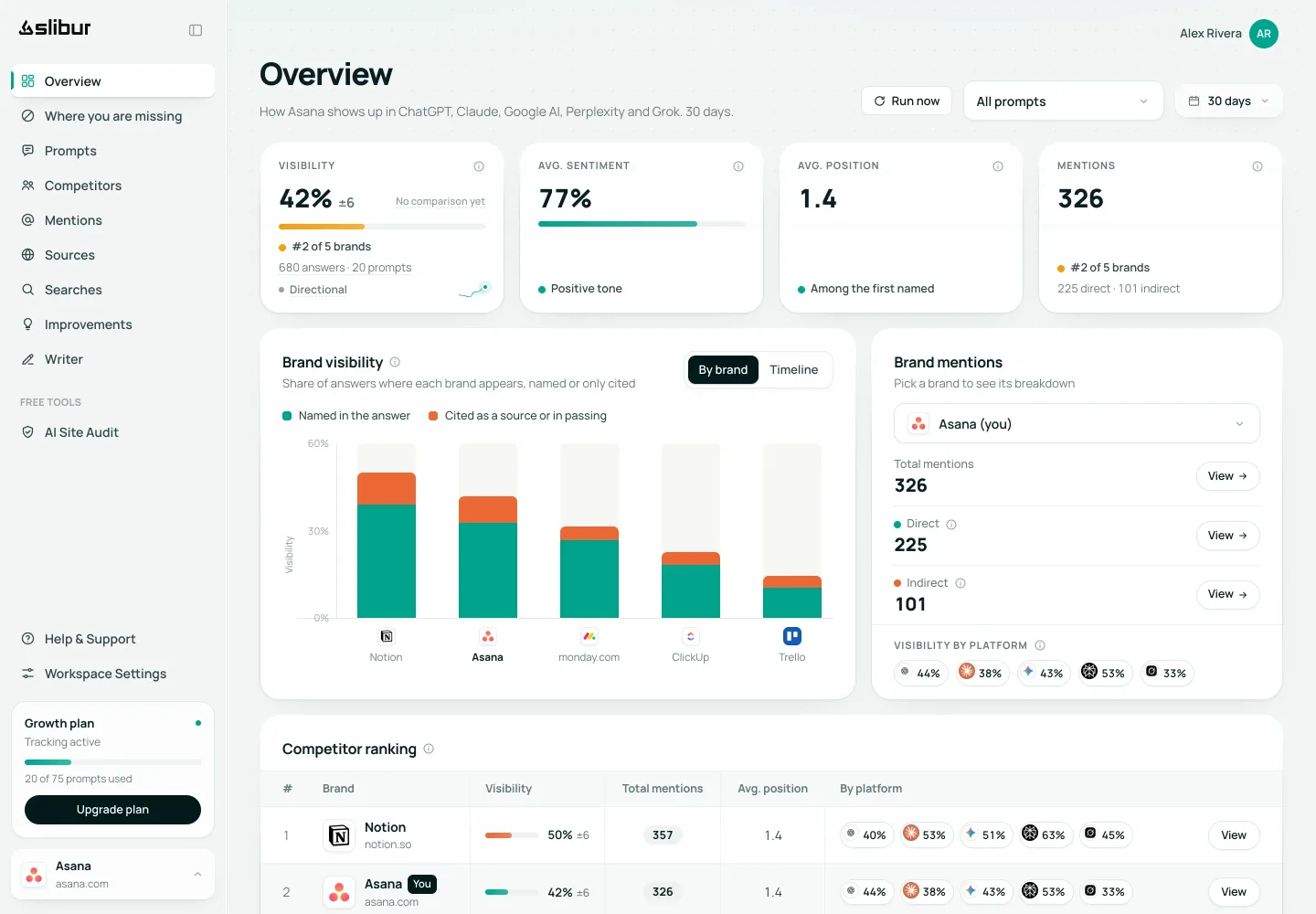
Slibur.com reads ChatGPT from chatgpt.com and Google AI Overviews from live results every day, and asks Claude, Perplexity and Grok every week through their APIs with web search turned on. Every answer is stored in full, together with the sources it cited and the searches the assistant ran before replying. When a number drops you can open the exact answer from before and after and read the difference yourself.
The monitoring layer is an email. Once a week it lists the changes that deserve attention: a visibility drop of 10 points or more, a competitor moving ahead of you, and a new negative mention. It also suggests causes, such as a third-party page that keeps recommending a rival. Mentions are counted even when the answer cites your site without naming you, which a plain name search misses.
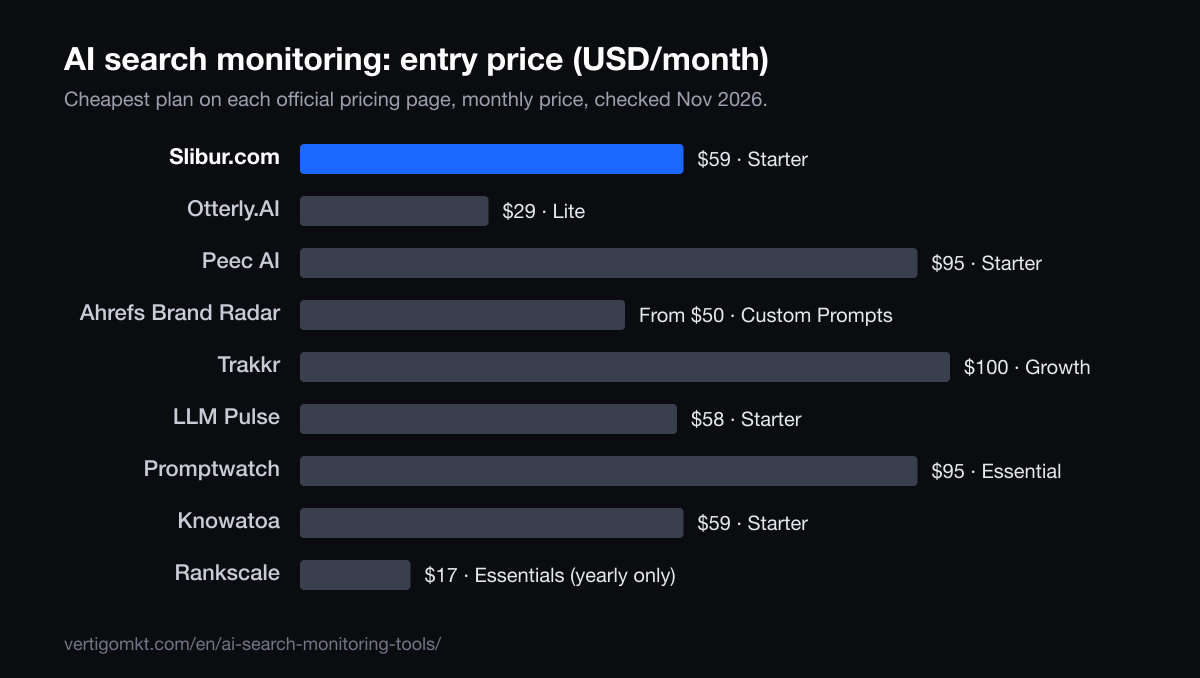
The limits are real. There are no real-time alerts: everything arrives in that weekly email. Claude, Perplexity and Grok are only checked weekly, Gemini, AI Mode and Copilot are not covered, and you cannot export data or pull it through an API. Starter costs $59 a month for 20 prompts, with a 7-day trial that needs no card.
Pros
- Full answers, sources and fan-out searches saved
- Weekly email with drops, rival moves and negative mentions
- Indirect mentions counted
- All five assistants on every plan
Cons
- No real-time alerts, only the weekly email
- Claude, Perplexity and Grok checked weekly
- No Gemini, AI Mode or Copilot
- No exports or API
Verdict: The best fit when you want one clear weekly read of what changed and the evidence behind it.
Source: Slibur.com pricing page, checked Nov 2026.
Try Slibur.com free for 7 days2. Otterly.AI
Solo marketers who check in a few times a week
Otterly.AI runs its prompts daily on ChatGPT, AI Overviews, Perplexity and Copilot, and records visibility, sentiment and citations. For $29 a month that is the cheapest way in this list to get a fresh reading every morning.
Gemini, AI Mode and Claude are paid add-ons, and Grok is not listed at all. With 15 prompts you have to choose the questions carefully, since the monitoring is only as good as what you ask.
Pros
- Daily refresh
- Low entry price
- No card for the trial
Cons
- 15 prompts on Lite
- Add-ons for Gemini, AI Mode and Claude
- No Grok
Verdict: Cheap, daily and simple. Good for watching a short list closely.
Source: Otterly.AI pricing page, checked Oct 2026.
3. Peec AI
Marketing teams who share one view of AI answers
Peec AI tracks 50 prompts daily on Starter at $95, on three engines you choose from ChatGPT, AI Mode, AI Overviews, Copilot, Gemini and Naver. It records position, sentiment and sources, and connects to Google Analytics.
Perplexity costs extra, and Claude and Grok only appear on Enterprise. If your monitoring needs are centered on Google and ChatGPT, that is not a problem.
Pros
- Daily on 50 prompts
- Choice of engines
- Google Analytics connection
Cons
- Only three engines on Starter
- Perplexity is extra
- Claude and Grok on Enterprise only
Verdict: A team tool for daily monitoring of Google and ChatGPT answers.
Source: Peec AI pricing page, checked Nov 2026.
4. SE Visible
SEO teams who monitor many topics at once
SE Visible, from SE Ranking, refreshes 75 prompts daily on Basic across ChatGPT, AI Overviews, AI Mode, Gemini and Copilot, and 200 on Core. That volume makes it easier to spot a shift that affects a whole topic rather than one question.
Claude is limited to the Agency plan, by API and without web search; Perplexity and Grok do not appear on the pricing page. The 10-day trial is long enough to see a few cycles of change before you pay.
Pros
- High daily volume
- Five engines
- 10-day trial
Cons
- No Perplexity
- No Grok
- More data than a small team will read
Verdict: The volume pick for teams with many topics to watch.
Source: SE Visible pricing page, checked Nov 2026.
5. Profound
Enterprise teams with analysts on staff
Profound monitors share of voice, citations, sentiment and rankings daily, and adds AI traffic analytics so you can connect answer changes to visits. Enterprise covers up to nine engines.
For brands there is no self-serve plan: a 7-day trial with 50 fixed prompts, then custom pricing. That makes it hard to justify unless monitoring is someone’s full-time job.
Pros
- Broad engine coverage
- AI traffic analytics
- Daily data
Cons
- Custom pricing only for brands
- Trial prompts cannot be edited
- No Grok or Meta AI listed
Verdict: Deep and broad, at enterprise prices.
Source: Profound pricing page, checked Oct 2026.
6. Ahrefs Brand Radar
SEOs who want monitoring inside a suite they know
Ahrefs Brand Radar sells custom prompts from $50 with 2,500 checks, run daily, weekly or monthly on engines you choose per prompt. That per-prompt schedule is useful for monitoring: run money questions daily and the rest monthly.
Alerts and summaries are handled through a separate Ahrefs product the page asks you to connect. There is no free trial, and Claude uses 8 checks per update, so the allowance can shrink quickly.
Pros
- Schedule per prompt
- Seven engines to choose from
- Familiar SEO suite
Cons
- No free trial
- Alerts need a separate product
- No Grok
Verdict: Flexible cadence for teams already paying for Ahrefs.
Source: Ahrefs Brand Radar pricing page, checked Oct 2026.
7. Trakkr
Watching many engines every day
Trakkr checks 50 prompts daily on eight engines, including DeepSeek and Meta AI, for $100 a month. If your audience uses assistants beyond the big three, that breadth matters.
The trial needs a card, and the site does not say how answers are collected, which is worth asking about before you rely on the numbers for decisions.
Pros
- Eight engines daily
- Meta AI and DeepSeek included
- Flat price
Cons
- Card required for the trial
- Collection method not stated
- 50 prompts
Verdict: The widest daily coverage at a fixed price.
Source: Trakkr pricing page, checked Oct 2026.
8. LLM Pulse
European teams happy with weekly data
LLM Pulse charges in euros: 49 € a month on weekly Starter for 50 prompts across ChatGPT, Perplexity, AI Mode, AI Overviews and Gemini. Daily tracking is a separate plan at 79 €. Exports in CSV, Excel and PDF come with every plan.
Claude, Grok and Copilot are paid add-ons, sentiment starts on Growth, and the 14-day trial on weekly plans needs a payment method. Daily plans start without a trial.
Pros
- 50 prompts on the entry plan
- Exports on every plan
- Gemini and AI Mode included
Cons
- Weekly unless you pay for daily
- Claude and Grok cost extra
- Card needed for the trial
Verdict: Plenty of prompts for a weekly rhythm, priced in euros.
Source: LLM Pulse pricing page, checked Nov 2026.
9. Promptwatch
Daily monitoring across many models under one cap
Promptwatch Essential is $95 a month for 50 prompts, refreshed daily, with a cap of 6,000 answers a month across the models it lists. That includes ChatGPT, AI Overviews, AI Mode, Perplexity, Claude and Gemini.
When the cap is reached, no more answers are generated until usage resets. For monitoring, a gap like that at the end of the month is exactly when you would miss a change.
Pros
- Many models
- Daily refresh
- 7-day trial
Cons
- Hard answer cap
- Conflicting statements on models per project
- Slower cadences need sales
Verdict: Broad coverage if you watch the meter.
Source: Promptwatch pricing page, checked Nov 2026.
10. Knowatoa
Teams that want a weekly change digest from Google and ChatGPT
Knowatoa Starter is $59 a month for ChatGPT, AI Overviews and AI Mode, and its pricing page promises a weekly digest of what changed. Growth at $199 adds Claude, Gemini, Meta AI and Perplexity, plus an API, an MCP server and Looker Studio.
The page does not state how many questions each plan includes or how long the trial lasts, so you will need to ask before comparing it fairly with the others.
Pros
- Weekly change digest
- AI Mode on the entry plan
- Unlimited sites under one limit
Cons
- Question limits not stated
- Only three engines on Starter
- Trial length not stated
Verdict: A digest-style monitor centered on Google and ChatGPT.
Source: Knowatoa pricing page, checked Nov 2026.
11. Rankscale
Setting a different cadence for each question
Rankscale uses credits and lets you run prompts anywhere from hourly to monthly on more than 17 engines. The Essentials plan starts at $17 a month, billed yearly only, with 120 credits.
Hourly checks sound attractive for monitoring, but they burn credits fast. Most teams will set a few questions to daily and leave the rest weekly.
Pros
- Hourly to monthly cadence
- 17+ engines
- Low entry price
Cons
- Credits to manage
- Yearly billing on the cheapest plan
- Small entry allowance
Verdict: The most control over timing, with credit bookkeeping attached.
Source: Rankscale pricing page, checked Oct 2026.
AI search monitoring software side by side
| Tool | Best for | Refresh | Entry price / month | How answers are collected |
|---|---|---|---|---|
| 1. Slibur.com | Small teams who want changes explained without living in a dashboard | ChatGPT and AI Overviews daily; Claude, Perplexity and Grok weekly | $59 (Starter) | App: reads the answer a person sees on chatgpt.com and the real AI Overview, not an API reply |
| 2. Otterly.AI | Solo marketers who check in a few times a week | Daily | $29 (Lite) | App (each AI’s website), except Claude through the API |
| 3. Peec AI | Marketing teams who share one view of AI answers | Daily | $95 (Starter) | App for most engines; labels its API models (Claude, Grok) |
| 4. SE Visible | SEO teams who monitor many topics at once | Daily | €80 (Basic) | App: the answer a user sees, in the app or on Google Search; Claude through the API, without web search |
| 5. Profound | Enterprise teams with analysts on staff | Daily | Custom (brands); agency plans from $99 | App: captured in the browser, not through model APIs |
| 6. Ahrefs Brand Radar | SEOs who want monitoring inside a suite they know | Daily, weekly or monthly | From $50 (custom prompts) | App for its built-in prompt set; not stated for custom prompts |
| 7. Trakkr | Watching many engines every day | Daily | $100 (Growth) | Not stated |
| 8. LLM Pulse | European teams happy with weekly data | Weekly by default; daily is a separate, pricier plan | $58 (Starter) | Not stated |
| 9. Promptwatch | Daily monitoring across many models under one cap | Daily | $95 (Essential) | Not stated |
| 10. Knowatoa | Teams that want a weekly change digest from Google and ChatGPT | Not stated per plan; weekly digest of changes | $59 (Starter) | Not stated |
| 11. Rankscale | Setting a different cadence for each question | Hourly to monthly, your choice | $17 (Essentials) | Mixed: labels app engines (AI Overviews, Copilot) and API engines |
Want your own numbers before you read further? Slibur.com’s 7-day trial needs no card and shows what ChatGPT, Google AI Overviews, Claude, Perplexity and Grok say about your brand.
Real-time alerts versus a weekly digest
Vendors like to promise instant alerts. It is worth thinking about what you would do with one. AI answers vary from run to run even when nothing important happened, so a tool that pings you every time a brand drops out of one answer will train your team to ignore it within a fortnight.
A digest takes the opposite approach. It waits, compares a week of runs, and reports only the changes that held up. You lose speed. You gain signal, and a single message is easier to forward to a manager than a stream of notifications.
- Real-time or daily alerts
- Useful during a launch, a crisis or a rebrand, when you need to know the same day if assistants pick up the news. Expect noise.
- Weekly digest
- Fits most brands, whose content and reputation change on a scale of weeks. Slibur.com and Knowatoa both work this way.
- Dashboard only
- Nothing comes to you. Fine for an analyst who logs in daily, risky for everyone else, because the change sits unseen until someone looks.
If you are not sure, start with a digest and keep a short list of five or so high-stakes prompts that you check by hand during busy weeks. That covers most situations without paying for a second tool.
Why saved answers matter more than the score
Every tool in this list produces a visibility number. Fewer let you read the answer behind it. That difference decides whether you can act on a drop or only report it.
Picture a 12-point fall in ChatGPT over a week. With only the score, you can guess. With the stored answers from before and after, you can see that the assistant now cites a listicle from a review site, that the listicle ranks a competitor first, and that your brand is mentioned only in passing near the bottom. That is a concrete task: get included in that page, or publish something the assistant prefers.
The academic work on generative engine optimization points the same way. The GEO study from Princeton and partners found that adding citations, quotations and statistics to a page raised its visibility in generative answers, which only becomes visible to you if your tool shows which pages were cited. When you shortlist a monitoring tool, open a sample answer during the trial and check three things: is the full text there, are the sources listed with links, and can you see what the assistant searched for before it answered.
A 20-minute weekly monitoring routine
A tool does not monitor anything if no one reads its output. This is the routine we suggest to clients, sized for one person once a week.
- Read the weekly email or change report first. Note any drop of 10 points or more, any new competitor and any negative mention.
- For each item, open the answer before and after the change. Write down which sources appeared or disappeared.
- Check whether one of those sources is a page you can influence: a directory, a review site, a comparison article, your own docs.
- Pick one action for the week, such as updating a page, asking to be added to a list or fixing a fact the assistant gets wrong.
- Log the action next to the date. In four to six weeks, look back and see whether the related prompts moved.
Keep the prompt set stable while you do this. If you change the questions every week, you lose the ability to compare runs. For ideas on writing those prompts, see our guide to LLM tracking tools, and for the reputational side, our list of AI brand monitoring tools.
How we chose these AI search monitoring tools
We read each vendor’s official pricing and product pages between October 19 and November 9, 2026, and compared four things that decide whether a tool actually monitors: how often it checks, how it tells you about changes, how much of each answer it keeps, and what the entry plan costs. Every figure on the cards comes from those pages and is dated in the source line.
Slibur.com is our product. It is first because it is the only tool here that combines five assistants on every plan, saved answers with their sources and searches, and a weekly email that names the changes, at a public price with a no-card trial. It is not the fastest: several rivals check every engine daily, and Slibur.com has no real-time alerts. We have said so on its card.
- Cadence
- Daily, weekly or user-set, and whether it is the same for every engine.
- How changes reach you
- Email, in-app flags or nothing at all until you log in.
- Evidence kept
- Full answer text, cited sources and the searches behind the answer.
- Price and trial
- Entry price per month and whether you can try it without a card.
Frequently asked questions
What is AI search monitoring?
It is the ongoing practice of asking AI assistants the questions your customers ask, on a schedule, and tracking how the answers change: whether your brand appears, how it is described and which sources are cited. Monitoring adds alerts or reports on top of the raw tracking so changes reach you without logging in.
Which AI search monitoring tool is best?
For a weekly, evidence-based summary across five assistants at a public price, we rank Slibur.com first; it is our product. Otterly.AI suits daily checks on a small budget, SE Visible suits Google-heavy daily monitoring, and Trakkr covers the most engines every day.
Do AI search monitoring tools send real-time alerts?
Some send daily or near real-time notifications, others a weekly digest. Slibur.com sends its alerts in a weekly email and has no real-time option. Knowatoa also describes a weekly digest. Ahrefs routes alerts through a separate product.
How often should AI answers be checked?
Daily checks catch changes sooner but contain more random variation. Weekly checks are enough for most brands, since content and reputation change slowly. A common setup is daily on a handful of revenue-related prompts and weekly on the rest.
How much does AI search monitoring software cost?
Entry plans in this list range from $17 a month (Rankscale, billed yearly) and $29 (Otterly.AI) to $99 or $100 for higher volumes. Slibur.com starts at $59. Profound uses custom pricing for brands after a 7-day trial.
Can I monitor AI search for free?
Only partly. One-off checkers such as HubSpot’s AI Search Grader give a snapshot, and several tools offer trials. Ongoing monitoring with saved history needs a paid plan. Slibur.com’s trial lasts 7 days with no card, and its readiness audit stays free afterwards.
Sources
Each tool card names the official page its figures come from. The guide also relies on:
- Google Search Central: AI features and your website
- OpenAI: Introducing ChatGPT search
- Aggarwal et al., GEO: Generative Engine Optimization (arXiv)
By the Vértigo Marketing team Published Data checked
Keep reading
- The 11 best AI brand monitoring tools in 2026: know what AI says about you
- The 11 best AI visibility tools for marketing teams in 2026
- LLM Pulse alternatives once you add Claude, Grok and daily checks
- GEO tracking tools: eleven trackers and where their numbers come from
- Vértigo Marketing GEO agency services in the United States
- GEO agency services in the United Kingdom