GEO tracking tools: eleven trackers and where their numbers come from
A GEO tracker asks AI assistants your buyers’ questions on a schedule and records who gets named. This list covers trackers only, no content editors, and compares how each one collects answers, how often, and how many you get per plan. Slibur.com is ours and sits first.
Generative engine optimization has a measurement problem. In classic SEO you can open Search Console and see impressions, clicks and average position for every query. Nothing like that exists for ChatGPT, Perplexity or Google’s AI Overviews. None of them reports to you which brands it recommended yesterday, or in response to which question. The only way to find out is to ask, over and over, and write down what comes back.
GEO tracking tools automate that loop. You give them a list of prompts, the questions a buyer would type, and they run those prompts against a set of assistants, store every answer and turn the pile into visibility, position, sentiment and source reports. That sounds simple. In practice the products split on three decisions that change what your numbers mean: whether they read the answer a person sees in the app or call a model through its API, how often they repeat each question, and how many answers your plan actually pays for.
This guide looks at those three decisions for eleven trackers with public terms. Tools whose main job is writing or rewriting content are left out on purpose. If you want the broader category, including optimization suites, our list of generative engine optimization tools covers it.
App answers or API answers: why the source matters
There are two ways to get an answer out of an assistant. A tracker can drive the product a person uses, such as chatgpt.com or a Google results page, and record what appears on screen. Or it can send the prompt to the model through the developer API and store the text it returns.
Calling the API is cheaper and easier to scale, which is why many tools use it for at least some engines. Its weakness is that the API and the app are not the same product. The consumer app may search the web, apply memory or location, show shopping cards and pick sources differently, while an API call returns whatever that endpoint and its settings produce. OpenAI describes ChatGPT search as a feature of the product that decides when to search and shows linked sources; an API request without the same tools will not behave the same way.
For Google the gap is wider. AI Overviews appear only inside search results, and Google’s own documentation says they draw on its index and ranking systems. A tracker that is not reading the results page is estimating, not observing.
- Read from the app or browser (as stated by the vendor): Slibur.com for ChatGPT and AI Overviews, SE Visible, Otterly.AI except Claude, Peec AI for most engines, Ahrefs for its built-in prompts.
- API for some engines, labeled: Slibur.com for Claude, Perplexity and Grok (web search on), Otterly.AI for Claude, Peec AI for Claude and Grok, Rankscale per engine.
- Not stated: Trakkr, Promptwatch, ZipTie, LLMrefs, Goodie AI, and Ahrefs for custom prompts.
None of this makes API data useless. It is consistent and fine for spotting trends. Just ask the vendor which route each engine uses before you compare two dashboards, and do not mix the two in one chart.
GEO trackers at a glance
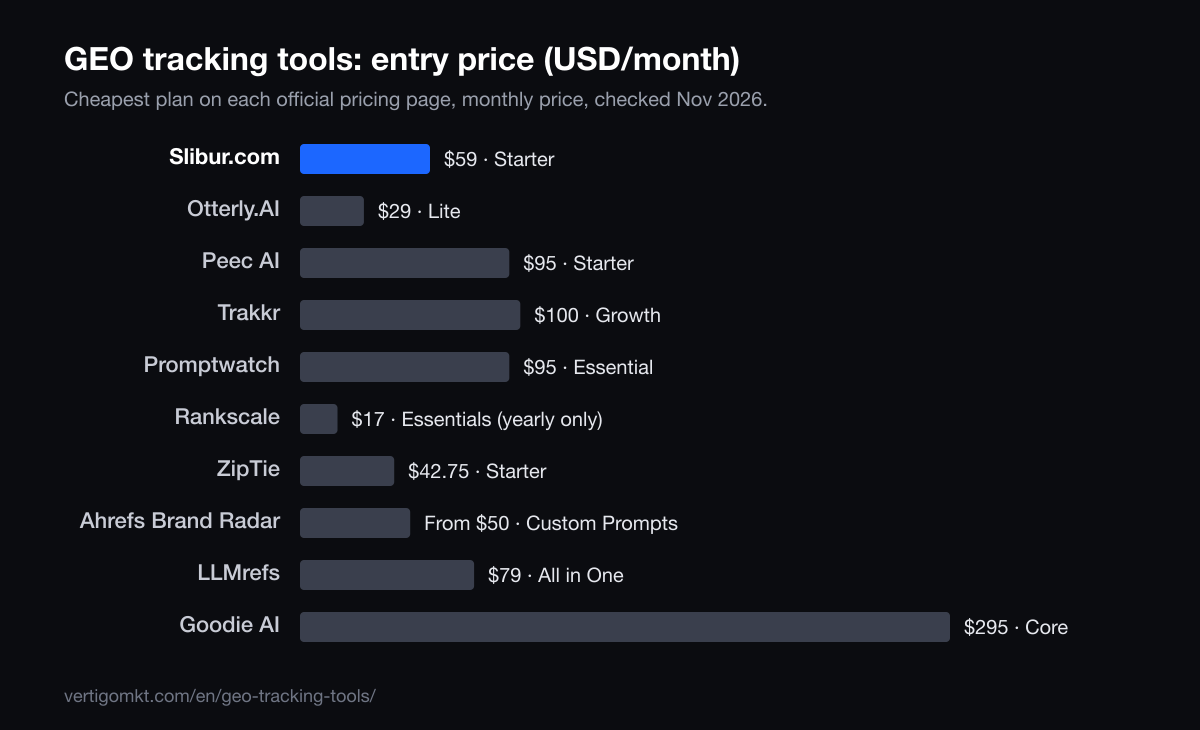
| Tool | Best for | How answers are collected | Refresh | Entry price / month |
|---|---|---|---|---|
| 1. Slibur.com | Brands that care more about faithful answers than raw volume | App: reads the answer a person sees on chatgpt.com and the real AI Overview, not an API reply | ChatGPT and AI Overviews daily; Claude, Perplexity and Grok weekly | $59 (Starter) |
| 2. SE Visible | SEO teams that want large daily samples | App: the answer a user sees, in the app or on Google Search; Claude through the API, without web search | Daily | €80 (Basic) |
| 3. Otterly.AI | Small brands with a short question list | App (each AI’s website), except Claude through the API | Daily | $29 (Lite) |
| 4. Peec AI | Marketing teams that want app answers and clear labels | App for most engines; labels its API models (Claude, Grok) | Daily | $95 (Starter) |
| 5. Trakkr | Teams that need many engines checked every day | Not stated | Daily | $100 (Growth) |
| 6. Promptwatch | Daily tracking across many models under one cap | Not stated | Daily | $95 (Essential) |
| 7. Rankscale | People who want to set their own check frequency | Mixed: labels app engines (AI Overviews, Copilot) and API engines | Hourly to monthly, your choice | $17 (Essentials) |
| 8. ZipTie | Paying only for the engines you track | Not stated | Daily | $42.75 (Starter) |
| 9. Ahrefs Brand Radar | SEO teams already working inside Ahrefs | App for its built-in prompt set; not stated for custom prompts | Daily, weekly or monthly | From $50 (custom prompts) |
| 10. LLMrefs | Wide weekly coverage built from keywords | Not stated | Weekly | $79 (All in One) |
| 11. Goodie AI | Larger teams that also want content agents on top of tracking | Not stated | Daily on every plan | $295 (Core) |
Want your own numbers before you read further? Slibur.com’s 7-day trial needs no card and shows what ChatGPT, Google AI Overviews, Claude, Perplexity and Grok say about your brand.
Quick answers by need
- You want to see the answer your buyer sees: Slibur.com. Reads chatgpt.com and live AI Overviews daily, plus Claude, Perplexity and Grok weekly, from $59.
- You need daily Google AI coverage: SE Visible. Five engines, AI Mode and Copilot among them, on 75 daily prompts for €80.
- You need a daily tracker under $30: Otterly.AI. 15 daily prompts on four engines for $29, read from each engine’s website.
The eleven GEO tracking tools
1. Slibur.com
Brands that care more about faithful answers than raw volume
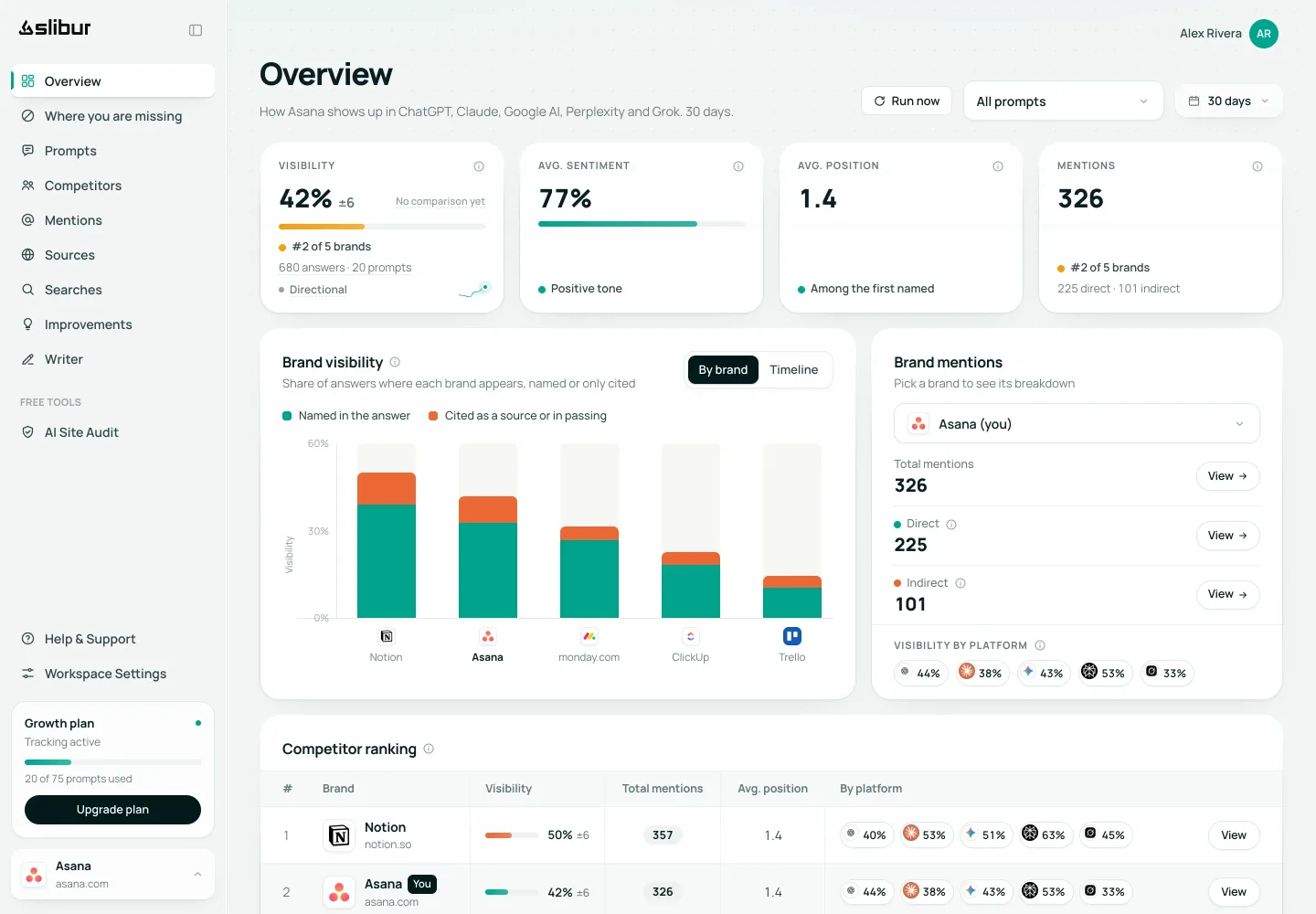
Slibur.com splits its collection by engine and tells you how. ChatGPT is read on chatgpt.com, the consumer product with web search on, and Google AI Overviews are read from the live results page. Both run every day. For Claude, Perplexity and Grok it uses each provider’s API, web search enabled, on a weekly cycle. All five engines are part of every plan, so nothing is billed as an add-on.
On the $59 Starter plan, 20 prompts produce roughly 1,440 answers a month. From those answers Slibur.com reports visibility, direct and indirect mentions (pages of yours cited without your name), position, sentiment, every cited source with its owner, competitors, and the fan-out queries the assistant searched before it wrote the reply. That last item is unusual and useful: it shows the search terms you would need to rank for to get pulled into the answer.
The gaps are real. Gemini as an app, Google AI Mode, Copilot, Meta AI and DeepSeek are not tracked. Three of the five engines are weekly, not daily. There is no CSV or PDF export, no API and no integrations, so the data stays in the dashboard and the weekly email, which is also where alerts arrive.
Pros
- Consumer ChatGPT and live AI Overviews, daily
- Five engines on every plan, no add-ons
- Indirect mentions and fan-out queries
- No-card 7-day trial
Cons
- No Gemini app, AI Mode or Copilot
- Claude, Perplexity and Grok only weekly
- No exports, API or integrations
- About 1,440 answers a month on Starter, fewer than volume trackers
Verdict: The pick when the question is “what does my customer actually read?” rather than “how many answers can I collect?”.
Source: Slibur.com pricing page, checked Nov 2026.
Try Slibur.com free for 7 days2. SE Visible
SEO teams that want large daily samples
SE Visible, from SE Ranking, leans on volume and Google coverage. Its Basic plan, €80 a month as shown in Spain, runs 75 prompts every day on ChatGPT, AI Overviews, AI Mode, Gemini and Copilot, and Core and Agency raise that to 200 and 1,000. It states that answers come from the browser interface rather than an API.
Claude is only on Agency, through the API and without web search, and Perplexity and Grok do not appear at all. Teams that report on Perplexity or Grok will need a second tool.
Pros
- Higher plans up to 1,000 prompts
- Browser collection stated
- Gemini and AI Mode included
Cons
- No Perplexity
- No Grok
- Claude only on Agency
Verdict: Large daily samples on Google-heavy engines.
Source: SE Visible pricing page, checked Nov 2026.
3. Otterly.AI
Small brands with a short question list
Otterly.AI documents its collection method in its help center: each assistant is read through its own website, with Claude as the exception, which goes through the API. Lite costs $29 for 15 prompts run daily on ChatGPT, AI Overviews, Perplexity and Copilot, which works out to about 1,800 answers a month if every prompt runs on every engine.
AI Mode and Gemini cost $9 each as add-ons, Claude costs $29 more, and Grok is not offered. The no-card trial makes it easy to try.
Pros
- Daily for $29
- Method documented publicly
- Copilot included
Cons
- 15 prompts on Lite
- Key engines are paid add-ons
- No Grok
Verdict: A low-cost daily tracker with an honest description of how it works.
Source: Otterly.AI pricing page, checked Oct 2026.
4. Peec AI
Marketing teams that want app answers and clear labels
Peec AI says it reads most engines from their apps and marks the ones that come from an API, which on its plans means Claude and Grok on Enterprise. Starter costs $95 for 50 prompts, refreshed daily, on three engines you pick from ChatGPT, AI Mode, AI Overviews, Copilot, Gemini and Naver.
Three engines times 50 prompts gives about 4,500 answers a month. Perplexity is an extra, and the pricing page does not give the trial length.
Pros
- App collection with API engines labeled
- Daily refresh
- Wide engine menu to choose from
Cons
- Only three engines on Starter
- Perplexity extra
- Trial terms unclear
Verdict: A transparent daily tracker if three engines are enough.
Source: Peec AI pricing page, checked Nov 2026.
5. Trakkr
Teams that need many engines checked every day
Trakkr runs 50 prompts daily on eight engines for $100: ChatGPT, Claude, Gemini, Perplexity, AI Overviews, Grok, DeepSeek and Meta AI. At full use that is about 12,000 answers a month, one of the larger samples at this price.
Its site does not say whether answers come from apps or APIs, and the 14-day trial asks for a card.
Pros
- Eight engines daily
- Meta AI and DeepSeek included
- Large sample at $100
Cons
- Collection method not stated
- Card needed for the trial
Verdict: Breadth and daily cadence together, with less clarity on method.
Source: Trakkr pricing page, checked Oct 2026.
6. Promptwatch
Daily tracking across many models under one cap
Promptwatch Essential costs $95 for 50 prompts and caps output at 6,000 answers a month. Its pricing page says every paid plan tracks all supported models, a list that includes ChatGPT, AI Overviews, AI Mode, Perplexity, Claude and Gemini.
Because the cap is on answers, adding engines eats into the same budget. The site does not describe how answers are collected.
Pros
- Broad model list
- Daily refresh
- Clear answer cap
Cons
- More engines means fewer runs per prompt
- Method not stated
- Conflicting statements on model limits across its pages
Verdict: A fair middle option if you watch the meter.
Source: Promptwatch pricing page, checked Nov 2026.
7. Rankscale
People who want to set their own check frequency
Rankscale sells credits rather than a fixed schedule. You choose for each prompt whether it runs hourly, daily, weekly or monthly, across more than 17 engines, and it labels which engines it reads from the app and which through an API. The yearly Essentials plan, at $17 a month, buys 120 credits, up to 480 answers.
That flexibility is powerful for a mixed list: your five money questions daily, the long tail monthly. Someone does have to plan the credits.
Pros
- Any cadence per prompt
- Over 17 engines
- Labels app and API engines
Cons
- Credits need managing
- Small answer budget at entry
- Cheapest tier is yearly only
Verdict: The most control over frequency, at the cost of simplicity.
Source: Rankscale pricing page, checked Oct 2026.
8. ZipTie
Paying only for the engines you track
ZipTie prices by engine. Its Starter preset is $42.75 for 50 daily prompts on ChatGPT, AI Overviews and Perplexity, about $0.01 per check, and each extra engine up to seven raises the bill.
That is around 4,500 answers a month at the preset. The method is not stated; the trial runs 7 days without a card.
Pros
- Low cost per check
- Daily on 50 prompts
- No-card trial
Cons
- Price climbs with each engine
- Method not stated
Verdict: Lean, predictable tracking for a few engines.
Source: ZipTie pricing page, checked Oct 2026.
9. Ahrefs Brand Radar
SEO teams already working inside Ahrefs
Ahrefs Brand Radar sells custom prompts from $50 with 2,500 checks, and you pick per prompt whether it runs daily, weekly or monthly on engines such as AI Overviews, AI Mode, ChatGPT, Perplexity, Gemini, Copilot and Claude. Claude costs 8 checks per update, so it drains the budget fast.
Ahrefs publishes a methodology for its built-in prompt set, read from the apps; for custom prompts the method is not stated. There is no trial.
Pros
- Per-prompt schedule
- Large built-in index
- Ties into Ahrefs SEO data
Cons
- No trial
- Claude is expensive in checks
- No Grok
Verdict: Convenient for Ahrefs users; plan your checks carefully.
Source: Ahrefs Brand Radar pricing page, checked Oct 2026.
10. LLMrefs
Wide weekly coverage built from keywords
LLMrefs turns keywords into prompts and reports weekly on about ten engines, from ChatGPT and AI Overviews to Meta AI and DeepSeek. The All in One plan is $79, marked as a limited-time price, with 500 prompts.
Weekly data and generated prompts suit research more than day-to-day monitoring. Method is not stated.
Pros
- 500 prompts
- About ten engines
- Free account, no card
Cons
- Weekly only
- Prompts generated from keywords
- Limited-time price
Verdict: The broadest coverage per dollar if weekly is fine.
Source: LLMrefs pricing page, checked Oct 2026.
11. Goodie AI
Larger teams that also want content agents on top of tracking
Goodie AI tracks daily on every plan. Core, at $295, includes 110 prompts on ChatGPT, AI Overviews, Perplexity, AI Mode and Copilot for one brand in two countries, which would be about 16,500 answers a month if every prompt runs on every engine daily (Goodie does not publish an answer count). Pro, at $999, adds Gemini and shopping assistants.
Much of the price pays for content and technical agents, which this list does not score. The collection method is not stated, and Pro and Enterprise go through a demo.
Pros
- Daily on all plans
- Copilot and AI Mode from Core
- Unlimited seats
Cons
- $295 entry price
- Method not stated
- No Claude or Grok below Enterprise
Verdict: Worth a look if you also want its agents; costly for tracking alone.
Source: Goodie AI pricing page, checked Nov 2026.
How many answers each entry plan really buys
Prompt counts on pricing pages are hard to compare, because one prompt on one engine once a week is a very different amount of data from one prompt on eight engines every day. Answers per month is the fairer unit. Here is the entry plan of each tracker on that basis.
| Tool | Entry plan | Answers per month | Basis |
|---|---|---|---|
| Slibur.com | $59, 20 prompts | About 1,440 | Published: daily on 2 engines, weekly on 3 |
| SE Visible | €80, 75 prompts | Not stated | The current pricing page gives no answer count |
| Otterly.AI | $29, 15 prompts | About 1,800 | Our calculation: 15 × 4 engines × 30 |
| Peec AI | $95, 50 prompts | About 4,500 | Our calculation: 50 × 3 engines × 30 |
| Trakkr | $100, 50 prompts | About 12,000 | Our calculation: 50 × 8 engines × 30 |
| Promptwatch | $95, 50 prompts | Up to 6,000 | Published cap |
| Rankscale | $17 (yearly), 120 credits | Up to 480 | Published |
| ZipTie | $42.75, 50 prompts | About 4,500 | Our calculation: 50 × 3 engines × 30 |
| Ahrefs Brand Radar | From $50 | 2,500 checks | Published; Claude uses 8 checks per update |
| Goodie AI | $295, 110 prompts | About 16,500 | Our calculation: 110 × 5 engines × 30 |
Two cautions. First, more answers is only better if they are the right answers: 30,000 replies to generated prompts tell you less about your pipeline than 1,000 replies to the questions your sales team hears every week. Second, our calculations assume every prompt runs on every engine every day. Real usage is often lower, especially with caps or credits.
A practical rule: start with the 15 to 30 questions that most often come before a purchase, track them on the engines your buyers use, and only then scale up volume for research.
What a GEO tracker cannot tell you
Trackers are good at one thing, sampling answers, and it is easy to read more into them than they hold. Keep these limits in mind when you report the numbers upward.
- How many people asked
- No assistant publishes prompt volumes. A tracker can tell you that you appear in 40 percent of answers to a question; it cannot tell you whether ten people or ten thousand asked it this month.
- Traffic and revenue
- Most trackers, Slibur.com included, do not measure visits or conversions from AI. For that you need your analytics, where referrals from chatgpt.com and perplexity.ai show up, and an honest view that many AI recommendations never produce a click at all.
- Personal answers
- Logged-in users get answers shaped by memory, location and earlier chats. A tracker sees a clean, logged-out or neutral view, so treat it as a baseline, not as what every user sees.
- Why the answer changed
- Trackers show that an answer moved. The cause, a new review page, a rival’s launch, a model update, needs a person to investigate. Source lists and fan-out queries help narrow it down.
The research that coined the term, the 2023 GEO paper from Princeton and partners, measured visibility as how much of a generated answer cited a source and found that adding statistics, quotations and citations to a page raised it. That is the right mental model: trackers measure presence in answers, and the work of earning that presence happens on your pages and on the sites assistants trust. If you want to see which of those sites are being cited, our guide to AI citation tracking tools goes deeper.
How we ranked these GEO tracking tools
We read each vendor’s official pricing, help and methodology pages between October 19 and November 9, 2026 and noted four things: how answers are collected, how often each prompt runs, how many answers the entry plan yields, and which engines are included without extra cost. When a vendor does not publish an answer count, we multiplied prompts by engines by 30 days and say so in the card.
Slibur.com is our product. It is first because it reads the consumer ChatGPT and live AI Overviews every day and includes Claude, Perplexity and Grok on every plan, with public prices and a trial without a card. On answer volume, engine count and data exports, several tools here beat it, and the cards say which.
- Collection method
- App or browser answers versus API replies, and whether the vendor says which.
- Cadence
- Daily, weekly or user-defined checks per prompt.
- Answers per month
- Published figure, or prompts × engines × 30 when none is published.
- Engines included
- What comes in the base price versus paid add-ons.
Frequently asked questions
What is a GEO tracking tool?
Software that runs a list of prompts against AI assistants such as ChatGPT, Perplexity and Google AI Overviews on a schedule, saves each answer and reports how often your brand appears, in what position, with what tone and next to which sources and competitors.
What is the best GEO tracking tool in 2026?
For faithful answers on the engines most buyers use, we rank Slibur.com first, from $59 a month with a no-card trial; Slibur.com is our product. SE Visible tracks 75 daily prompts on five engines for €80 a month, and Trakkr covers eight engines daily for $100.
Do GEO trackers use the ChatGPT app or the API?
It depends on the tool. Slibur.com, SE Visible, Otterly.AI and Peec AI say they read most answers from the app or browser and label any API engines. Several others do not state their method, so ask before you buy.
How often should a GEO tracker check prompts?
Daily for the questions closest to a sale, especially on ChatGPT and AI Overviews, where answers move most. Weekly is enough for research prompts and slower engines. Tools like Rankscale and Ahrefs let you set the cadence per prompt.
How many prompts do I need to track?
Most brands start with 15 to 30 real buyer questions. That is enough to see a trend without paying for noise. Add more once you know which topics move and which assistants your customers use.
Can a GEO tracker show traffic from AI?
Usually not. Trackers measure presence in answers. Visits from AI assistants are measured in your analytics tool through referrals such as chatgpt.com. A few platforms connect to analytics data, but none can see clicks that never happen.
Is there a free GEO tracker?
For ongoing tracking, free options are limited. Most tools offer a trial: Slibur.com, Otterly.AI and ZipTie run 7 days without a card. LLMrefs has a free account. For one-off snapshots, see our list of free GEO tools.
Sources
Each tool card names the official page its figures come from. The guide also relies on:
- GEO: Generative Engine Optimization (arXiv, 2023)
- Google Search Central: AI features and your website
- OpenAI: Introducing ChatGPT search
By the Vértigo Marketing team Published Data checked
Keep reading
- 13 best generative engine optimization tools for 2026: GEO trackers, suites and writers
- AI citation tracking tools: who shows which pages the answers really cite
- Goodie AI alternatives with public prices and shorter commitments
- LLM Pulse alternatives once you add Claude, Grok and daily checks
- Vértigo Marketing GEO agency services in the United States
- GEO agency services in the United Kingdom