AI citation tracking tools: who shows which pages the answers really cite
An AI answer can praise a rival while quoting your blog, or name you and cite nobody. AI citation tracking tools separate those cases. We compared ten on how they report sources. Slibur.com, which we build, leads for sorting every source by owner on all plans.
Most visibility dashboards open with one number: how often the assistant says your name. Citations answer a different question. They tell you which web pages fed the answer, and that is the part of AI search you can actually act on, because a page can be edited, pitched, replaced or earned.
Nearly every tracker now has a sources tab, so the useful comparison is finer. Does the tool tell you who owns each domain? Does it count answers that link to you without naming you? Can you see the exact page, or only the domain? Those details decide whether a report turns into a to-do list or stays a chart.
A mention and a citation are different signals
A mention means the answer contains your brand name. A citation means the answer points to a page as its source. The two overlap less than you would expect, which creates four situations worth telling apart:
- Named and cited. The best case. Your name appears and readers get a link.
- Named, not cited. The assistant knows you, but another site is shaping what it says.
- Cited, not named. Your page did the work and a competitor may get the credit. A simple text match misses this.
- Neither. You are absent, and the sources list shows whose pages hold your place.
A good citation tracker lets you filter by these cases. If a tool cannot, you are left guessing whether a page is earning you anything.
Short version
- Best source breakdown on every plan: Slibur.com. Each cited URL is labeled as yours, a competitor’s or a third party’s, from $59.
- Best with CSV exports: Peec AI. Daily sources from app-based answers, exportable from $95.
- Best next to backlink data: Ahrefs Brand Radar. Citations sit in the same suite as Site Explorer if you hold an Ahrefs plan.
AI citation trackers side by side
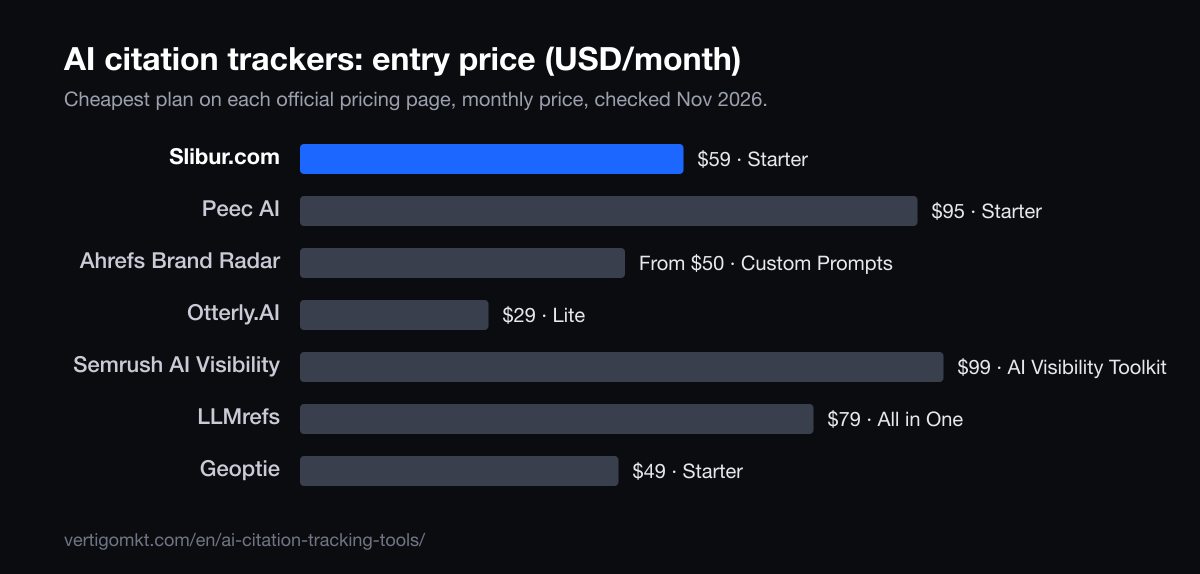
| Tool | Best for | AI engines | Entry price / month | Free trial |
|---|---|---|---|---|
| 1. Slibur.com | Finding which third-party pages to win and which of your pages already work | ChatGPT, Google AI Overviews, Claude, Perplexity, Grok (all five on every plan) | $59 (Starter) | 7 days, no card |
| 2. Peec AI | Teams that analyze sources in their own spreadsheets | Pick 3: ChatGPT, AI Mode, AI Overviews, Copilot, Gemini, Naver. Perplexity extra | $95 (Starter) | Yes, length not stated |
| 3. Ahrefs Brand Radar | SEO teams who want to compare cited pages with link profiles | AI Overviews, AI Mode, ChatGPT, Perplexity, Gemini, Copilot, Claude (8 checks per update) | From $50 (custom prompts) | No free trial |
| 4. Profound | Enterprise citation analysis with traffic data | Trial: ChatGPT, Gemini, AI Overviews; 9 on Enterprise | Custom (brands); agency plans from $99 | 7 days, fixed prompts |
| 5. Otterly.AI | A low-cost daily look at sources | ChatGPT, AI Overviews, Perplexity, Copilot. Add-ons: AI Mode +$9, Gemini +$9, Claude +$29 | $29 (Lite) | 7 days, no card |
| 6. SE Visible | A big citation sample | ChatGPT, AI Overviews, AI Mode, Gemini, Copilot. Claude only on Agency (€355), through the API | €80 (Basic) | 10 days (card not stated) |
| 7. Semrush AI Visibility | Teams who already run Semrush | Mentions from ChatGPT, Google AI, Gemini, Perplexity. Your prompts: ChatGPT Search, AI Mode or Gemini, one per campaign | $99 per domain | No free trial |
| 8. LLMrefs | Weekly citation data on many keywords | ChatGPT, AI Overviews, AI Mode, Gemini, Perplexity, Claude, Grok, Copilot, Meta AI, DeepSeek | $79 (All in One) | 7 days; free account, no card |
| 9. Geoptie | Two brands on a small budget | Pick 4: ChatGPT, Claude, Perplexity, Gemini, Copilot, AI Mode, AI Overviews | $49 (Starter) | None listed |
| 10. Scrunch | Pairing citations with AI crawler activity | ChatGPT, Perplexity, AI Overviews, Copilot; Claude, Grok on Enterprise | $250 (Core) | 7 days |
Want your own numbers before you read further? Slibur.com’s 7-day trial needs no card and shows what ChatGPT, Google AI Overviews, Claude, Perplexity and Grok say about your brand.
Ten tools that report AI citations
1. Slibur.com
Finding which third-party pages to win and which of your pages already work
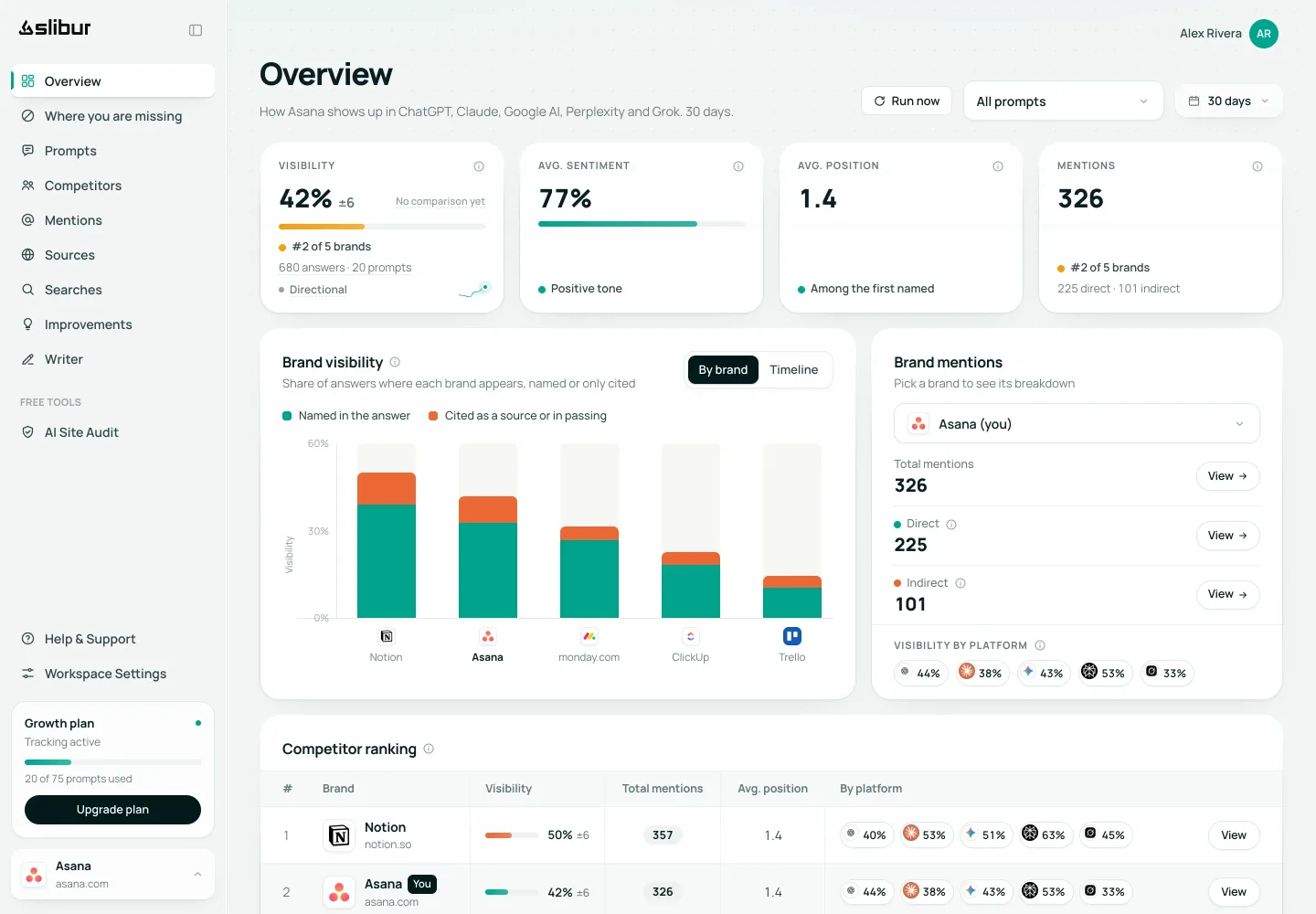
Slibur.com logs each URL an answer cites, its domain and how often it recurs, then labels the source as yours, a competitor’s or a third party’s. The Most cited domains view turns that into a quick list of sites worth approaching. It also reports the share of answers that cite your site, and counts indirect mentions, meaning answers that link to you without using your brand name. Plenty of dashboards would score those at zero.
Next to the sources you can read the full unedited answer and the searches the assistant ran before writing it, which helps explain why a given page was picked. ChatGPT comes from chatgpt.com and AI Overviews from Google’s live results every day; Claude, Perplexity and Grok are asked weekly through their APIs with web search on.
Starter costs $59 for 20 prompts. You get 7 days free with no card. Exports are the obvious gap: if your workflow depends on moving source lists into a spreadsheet, Slibur.com cannot do it today.
Pros
- Sources labeled by owner
- Indirect mentions counted
- Full answers and fan-out searches visible
- Five engines on all plans
Cons
- No CSV export of sources
- No Gemini app, AI Mode or Copilot
- Three engines refresh weekly
Verdict: The most direct route from “who gets cited” to “what we do next” at this price. Teams that need raw exports should look at Peec AI or Semrush.
Source: Slibur.com pricing page, checked Nov 2026.
Try Slibur.com free for 7 days2. Peec AI
Teams that analyze sources in their own spreadsheets
Peec AI reports sources alongside visibility, position and sentiment, refreshed daily from the apps for most engines. Custom CSV exports come with every plan, including the $95 Starter with 50 prompts, and competitors are unlimited.
You pick three engines per plan. Perplexity, one of the assistants that cites most visibly, costs extra, and Claude and Grok wait for Enterprise.
Pros
- CSV exports
- App-based answers for most engines
- Unlimited users and competitors
Cons
- Three engines per plan
- Perplexity extra
- Trial terms not stated
Verdict: A strong pick when the analysis happens outside the tool.
Source: Peec AI pricing page, checked Nov 2026.
3. Ahrefs Brand Radar
SEO teams who want to compare cited pages with link profiles
Ahrefs Brand Radar tracks mentions, citations and share of voice, with custom prompts from $50 a month and no other Ahrefs plan required. Lite subscribers at $129 get just 5 daily prompts included, but they also get the rest of the suite.
For citation work, that suite is the real draw: a cited domain can be opened in Site Explorer right away. There is no free trial, and Ahrefs states its app-based method only for the built-in prompt set.
Pros
- Citations alongside backlink tools
- Seven engines picked per prompt
- API and MCP on full plans
Cons
- No free trial
- Few prompts on Lite
- No Grok
Verdict: Natural for anyone already living in Ahrefs.
Source: Ahrefs Brand Radar pricing page, checked Oct 2026.
4. Profound
Enterprise citation analysis with traffic data
Profound captures answers in the browser, not through model APIs, and reports citations, share of voice and sentiment on up to nine engines at Enterprise level. It also lists Agent Analytics, which looks at AI-sourced traffic, so citations can be set against visits.
Brands get a 7-day trial on a fixed set of 50 prompts, then custom pricing.
Pros
- Browser-captured answers
- AI traffic analytics
- Up to nine engines
Cons
- No public brand price
- Trial prompts cannot be edited
- No Grok or Meta AI listed
Verdict: For large teams with a budget and a procurement process.
Source: Profound pricing page, checked Oct 2026.
5. Otterly.AI
A low-cost daily look at sources
Otterly.AI includes citations from its $29 Lite plan, with daily checks on ChatGPT, AI Overviews, Perplexity and Copilot read from each engine’s website. That makes it the cheapest flat plan here for watching Perplexity’s links every day.
Fifteen prompts is a small sample, though, and Claude costs an extra $29 a month at that level.
Pros
- Lowest flat price here
- Perplexity included daily
- No-card trial
Cons
- 15 prompts on Lite
- Claude add-on
- No Grok
Verdict: Good for a first citation report on a tight budget.
Source: Otterly.AI pricing page, checked Oct 2026.
6. SE Visible
A big citation sample
Citation analysis improves with sample size, and SE Visible is built for volume: 75 prompts checked daily for €80 on Basic (as shown in Spain), 200 on Core and 1,000 on Agency, across ChatGPT, AI Overviews, AI Mode, Gemini and Copilot, collected through the browser interface.
Perplexity no longer appears on its pricing page, Grok is absent, and Claude is limited to Agency, by API and without web search.
Pros
- Daily checks on five engines
- Browser-based collection
- 10-day trial
Cons
- No Perplexity
- No Grok
- Works best with SE Ranking
Verdict: The volume choice when one-off citations would mislead you.
Source: SE Visible pricing page, checked Nov 2026.
7. Semrush AI Visibility
Teams who already run Semrush
The Semrush AI Visibility Toolkit reports sources with visibility, mentions and position. At $99 per domain it includes 25 prompts, and exports reach CSV, Excel, Google Sheets and PDF.
Each Prompt Tracking campaign covers one engine (ChatGPT Search, AI Mode or Gemini), while the pricing page now lists mentions in ChatGPT, Google AI, Gemini and Perplexity. Claude, Grok and Copilot are not listed.
Pros
- Many export formats
- Fits Semrush workflows
- Daily prompt tracking
Cons
- No free trial for the toolkit
- One engine per campaign
- Extra user means extra license
Verdict: Convenient inside Semrush, narrow outside it.
Source: Semrush AI Visibility pricing page, checked Nov 2026.
8. LLMrefs
Weekly citation data on many keywords
LLMrefs builds prompts from your keywords and tracks 500 of them weekly for $79 a month, reporting citations, share of voice and position across about ten engines.
Because you do not write the prompts yourself, the sources reflect what its generator asks, which may differ from how your buyers phrase things.
Pros
- 500 prompts
- About ten engines
- Free account
Cons
- Weekly only
- Generated prompts
- Price marked limited time
Verdict: A wide net at a low price, refreshed slowly.
Source: LLMrefs pricing page, checked Oct 2026.
9. Geoptie
Two brands on a small budget
Geoptie’s $49 Starter covers 15 prompts and two brands on any four of seven engines, Claude included, with daily citations, sentiment and competitors.
No trial is listed for the paid plan, although it offers free one-off tools. The method is not stated.
Pros
- Two brands at entry
- Pick four engines
- Free one-off tools
Cons
- 15 prompts
- No Grok
- No trial listed
Verdict: Handy for a small team watching a second brand.
Source: Geoptie pricing page, checked Oct 2026.
10. Scrunch
Pairing citations with AI crawler activity
Scrunch reports citations together with AI bot traffic, so you can compare what gets cited with what AI crawlers fetch on your site. Core costs $250 a month for 125 prompts and 5,000 answers on four engines.
Collection mixes browser automation and official APIs depending on the platform, which Scrunch documents.
Pros
- AI bot traffic
- Method documented
- 7-day trial
Cons
- $250 entry
- Claude and Grok on Enterprise
- Four engines on Core
Verdict: For technical teams who want the crawl side of the story.
Source: Scrunch pricing page, checked Oct 2026.
Who owns the source decides what you do next
A raw list of cited domains is interesting for five minutes. Sorted by owner, it becomes a plan.
- Your own pages
- Find out which ones get picked, then look at what they share. Keep them current, and link to them from pages that do not get cited.
- Competitor pages
- If a rival’s comparison page keeps appearing, the assistant is reading their framing of your market. Publish a fair comparison of your own that answers the same question.
- Review sites and directories
- Often the fastest wins. A profile on a site the assistants already trust can be claimed or completed in an afternoon.
- Editorial and community pages
- Listicles, trade press and forum threads take longer. Contact the authors with something useful, such as data or a correction, and join threads honestly as yourself.
The GEO study from Princeton and collaborators found that adding statistics, quotations and sources to a page can raise its visibility in generative answers. Treat that as a starting hypothesis for your own pages, then watch the citation data to see whether it holds in your category.
How to read a citation report in twenty minutes a week
- Open the most cited domains for your priority prompts and compare them with last month. New names matter more than big numbers.
- Mark every domain you could influence this quarter. Ignore the ones you cannot, such as encyclopedias or government sites.
- Pick one prompt you lose and read the complete answer, not only its link list. Check which claims came from which source.
- Look at the searches the assistant ran, if your tool exposes them. They often reveal the phrasing your page should answer.
- Write down one action and its date, so you can check later whether citations moved after it.
That last step is the one teams skip. Without a dated note, a rise in citations three weeks later is just a nice surprise and teaches you nothing.
Three ways citation data misleads people
First, answers vary. The same prompt asked twice can return different links, so one appearance is an anecdote. Judge a page across many runs and several weeks.
Second, engines cite differently. Perplexity shows sources on nearly every answer, while a ChatGPT reply may show few or none depending on whether it searched. Averaging both into one “citation rate” hides that, so compare each engine with itself over time.
Third, a citation is not a visit. Google says clicks from AI features are reported inside the overall Web search totals in Search Console, with no separate line. To see whether being cited sends real people, check referral traffic in your analytics, and remember that many readers never click. If you also want to see how brands fare in Google’s feature specifically, our guide to AI Overviews tracking tools covers that ground.
How we judged these AI citation trackers
We read each vendor’s pricing and documentation between October 19 and 24, 2026 and recorded what it says about citations, sources, engines, refresh rate and collection method. We did not audit the accuracy of any tool’s source data, so treat feature descriptions as vendor claims. Each card links to its source.
Slibur.com is ours. It takes first place because source ownership and indirect mentions are included on every plan at a public price, and because it shows the answer and searches behind each citation. Its lack of exports is a real weakness for this use case, and rivals beat it there.
- Source detail
- Whether the report goes down to the URL and says who owns it.
- Citation engines
- Coverage of assistants that show links, Perplexity and AI Overviews above all.
- Sample size
- Prompts and answers per month, since single citations prove little.
- Getting data out
- Exports and API for teams that work outside the dashboard.
Frequently asked questions
What is the best AI citation tracking tool?
We put Slibur.com first because it labels every cited source as yours, a competitor’s or a third party’s and counts answers that cite you without naming you, on all plans from $59 a month. It is our product. Peec AI suits teams that need CSV exports, and SE Visible suits teams that want a large daily sample on Google’s AI surfaces.
What is AI citation tracking?
It is the regular recording of which web pages AI assistants cite when they answer a set of questions. The report shows how often your pages appear, which rival and third-party pages appear instead, and how that changes over time.
What is the difference between an AI mention and an AI citation?
A mention is your brand name inside the answer text. A citation is a link or reference to a page used as a source. You can have either without the other, and both are worth tracking.
Which AI assistants show citations?
Perplexity and Google AI Overviews show sources routinely. ChatGPT, Claude and Grok show them when they search the web, which depends on the question and the setup. That is why a tracker should say whether web search was on for each engine.
How many prompts do I need to track citations?
Enough to see patterns. Twenty well-chosen prompts checked daily give a useful starting picture for one product. Broader sites may want 50 to 200, and it pays to group them by topic so you can see which pages win where.
Can I get AI citations by fixing my robots.txt?
Access is a precondition, not a strategy. If you block crawlers such as OAI-SearchBot, your pages may not appear in ChatGPT search, so check that first. After that, citations depend on whether your page answers the question well and whether other sources back it up.
Keep reading
- The best LLM tracking tools in 2026 for brand visibility across AI models
- The 11 best AI Overview tracking tools in 2026 for Google’s AI answers
- 10 Ahrefs Brand Radar alternatives for tracking your own prompts in 2026
- The 8 best GEO audit tools in 2026, with a 20-point checklist to run your own
- Vértigo Marketing GEO agency services in the United States
- GEO agency services in the United Kingdom
Sources
Each tool card names the official page its figures come from. The guide also relies on:
- Aggarwal et al., GEO: Generative Engine Optimization (arXiv)
- Google Search Central: AI features and your website
- OpenAI: overview of OpenAI crawlers
By the Vértigo Marketing team Published Data checked