The best LLM optimization tools in 2026, from AI answers to a fix list
A tracker tells you ChatGPT skipped your brand. An LLM optimization tool should also tell you why and what to change next. We sorted eleven LLMO tools by how much of that loop they cover: measure, diagnose, assign the work, draft the page. Slibur.com, which we make, is first.
LLM optimization, or LLMO, is the work of making large language models mention, recommend and cite your brand when people ask them for advice. The idea is simple. The hard part is the gap between seeing a number and knowing what to do about it. A dashboard that says your visibility in ChatGPT dropped from 31% to 22% is useful for about a minute; after that you need to know which answers changed, which pages the model leaned on instead of yours, and what you could publish or fix this week.
That gap is how we split this market. Some products measure and stop there, and they are covered in our guide to LLM tracking tools. The eleven below go further: they audit your site for AI access, turn the data into tasks, or draft content for the questions you are losing. Some do all three, most do one or two, and the prices range from $29 a month to custom contracts.
Every price, plan limit and feature claim comes from the vendor’s own pricing page, with the date it was read. Where a vendor does not say something, we write that it is not listed rather than guess.
Measuring AI answers versus fixing them
Most products sold as LLM optimization tools are, underneath, trackers. They send prompts to models and count mentions. That is a necessary first step, because you cannot optimize what you have not measured, but it leaves the hardest question open. Here is how the eleven tools split across the four jobs, based only on what their pricing pages list.
| Tool | Measures | Diagnoses | Assigns work | Drafts content |
|---|---|---|---|---|
| Slibur.com | 5 platforms | Free 18-check audit | 3 to 8 tasks a week | 5 to 40 drafts a month |
| Otterly.AI | 4 engines + add-ons | GEO URL audits | 3 recommendations a week (Lite) | Not listed |
| Goodie AI | 5 engines on Core | Page scorecard, technical agent | Agents on credits | Writer and blog agents |
| Promptwatch | All models in a cap | Audit pages; crawler logs from Professional | Agent credits | Articles from Professional |
| AthenaHQ | 5 free, 11 on Starter | Not listed | Content recommendations | Not listed |
| Writesonic | 3 engines | Not listed | Not listed | Core product |
| AIclicks | 3 engines of 5 | Free visibility audit | Not listed | AI-written content |
| Profound | Up to 9 engines | AI traffic analytics | AI Marketer agents | Not listed |
| Scrunch | 4 engines on Core | 5 site audits a month | Not listed | Not listed |
| Peec AI | 3 models of 6 | Not listed | Agent credits | Not listed |
| Semrush | 1 engine per campaign | AI checks in Site Audit | Not listed | Not listed |
“Not listed” means the plan pages we read do not mention it, which is different from saying the feature cannot exist. If one column matters most to you, ask the vendor before you buy.
Picks by job
- Measure, diagnose and draft in one plan: Slibur.com. Five AI platforms, a free 18-check audit, weekly improvement tasks and a content writer, from $59 a month.
- Cheapest tracker with built-in recommendations: Otterly.AI. Three recommendations a week and 1,000 GEO audits a month on a $29 plan.
- Most agent-driven fixes: Goodie AI. Content, optimization and technical agents on top of daily tracking.
- Most diagnostics per plan: Promptwatch. Page audits, agent credits and, from Professional, crawler logs and AEO articles.
- Free plan with recommendations: AthenaHQ. Content recommendations and an AI agent on a free plan with 300 credits.
LLM optimization tools at a glance
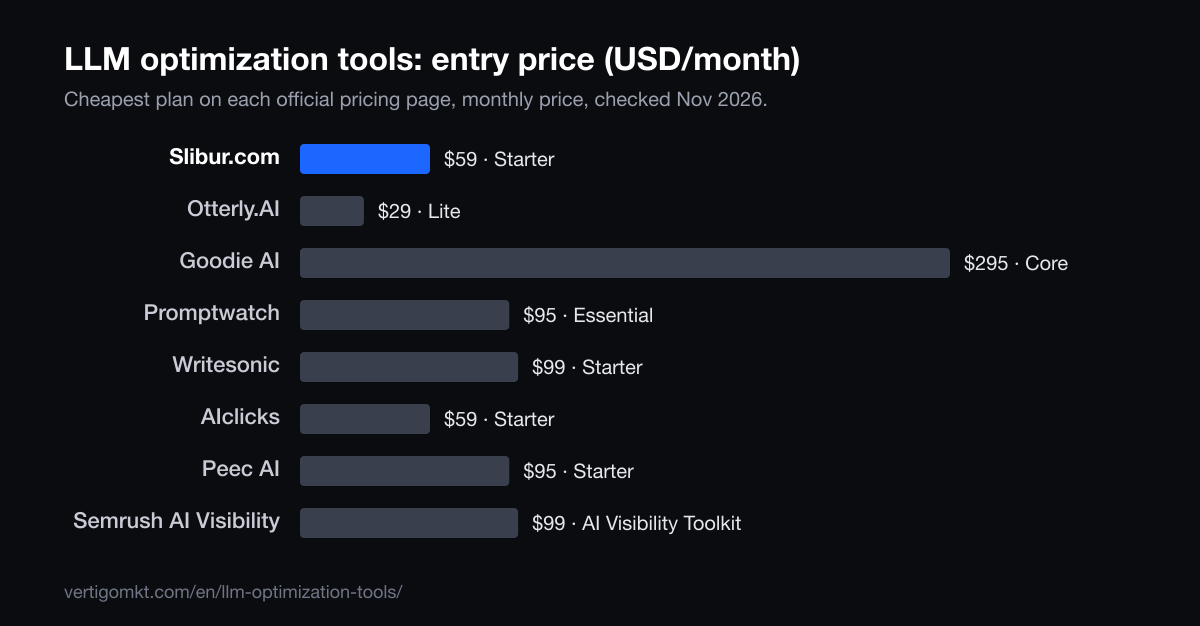
| Tool | Best for | Entry price / month | Refresh | What’s free |
|---|---|---|---|---|
| 1. Slibur.com | Teams that want the data and the to-do list in the same place | $59 (Starter) | ChatGPT and AI Overviews daily; Claude, Perplexity and Grok weekly | Free 18-check AI-readiness audit, kept after the 7-day trial |
| 2. Otterly.AI | Small teams that want audits and a few weekly pointers on a low budget | $29 (Lite) | Daily | 7-day trial, no card |
| 3. Goodie AI | Brands with budget that want agents to produce fixes | $295 (Core) | Daily on every plan | 7-day trial on Core |
| 4. Promptwatch | Technical teams that want to see crawlers and answers side by side | $95 (Essential) | Daily | 7-day trial |
| 5. AthenaHQ | Trying recommendations before paying, then scaling to 11 models | $295 (Starter) | Credit based | Free plan: 300 credits on 5 models |
| 6. Writesonic | Teams whose main gap is producing content | $99 (Starter) | Daily | Free start, no card |
| 7. AIclicks | A free audit first, then tracking with AI-written content | $59 (Starter) | Daily | Free visibility audit without signup; 3-day trial |
| 8. Profound | Enterprises that want agents, traffic data and a managed rollout | Custom (brands); agency plans from $99 | Daily | 7-day trial with 50 fixed prompts |
| 9. Scrunch | Brands that also track AI bot traffic | $250 (Core) | Every 72 hours (daily for new prompts in their first 14 days) | 7-day trial |
| 10. Peec AI | Daily data on three chosen models, with agent credits | $95 (Starter) | Daily | Free trial (length not stated) |
| 11. Semrush AI Visibility | Semrush users who want AI checks inside their site audit | $99 per domain | Daily (brand reports weekly) | No free trial for the toolkit |
Want your own numbers before you read further? Slibur.com’s 7-day trial needs no card and shows what ChatGPT, Google AI Overviews, Claude, Perplexity and Grok say about your brand.
Eleven LLM optimization tools, reviewed
1. Slibur.com
Teams that want the data and the to-do list in the same place
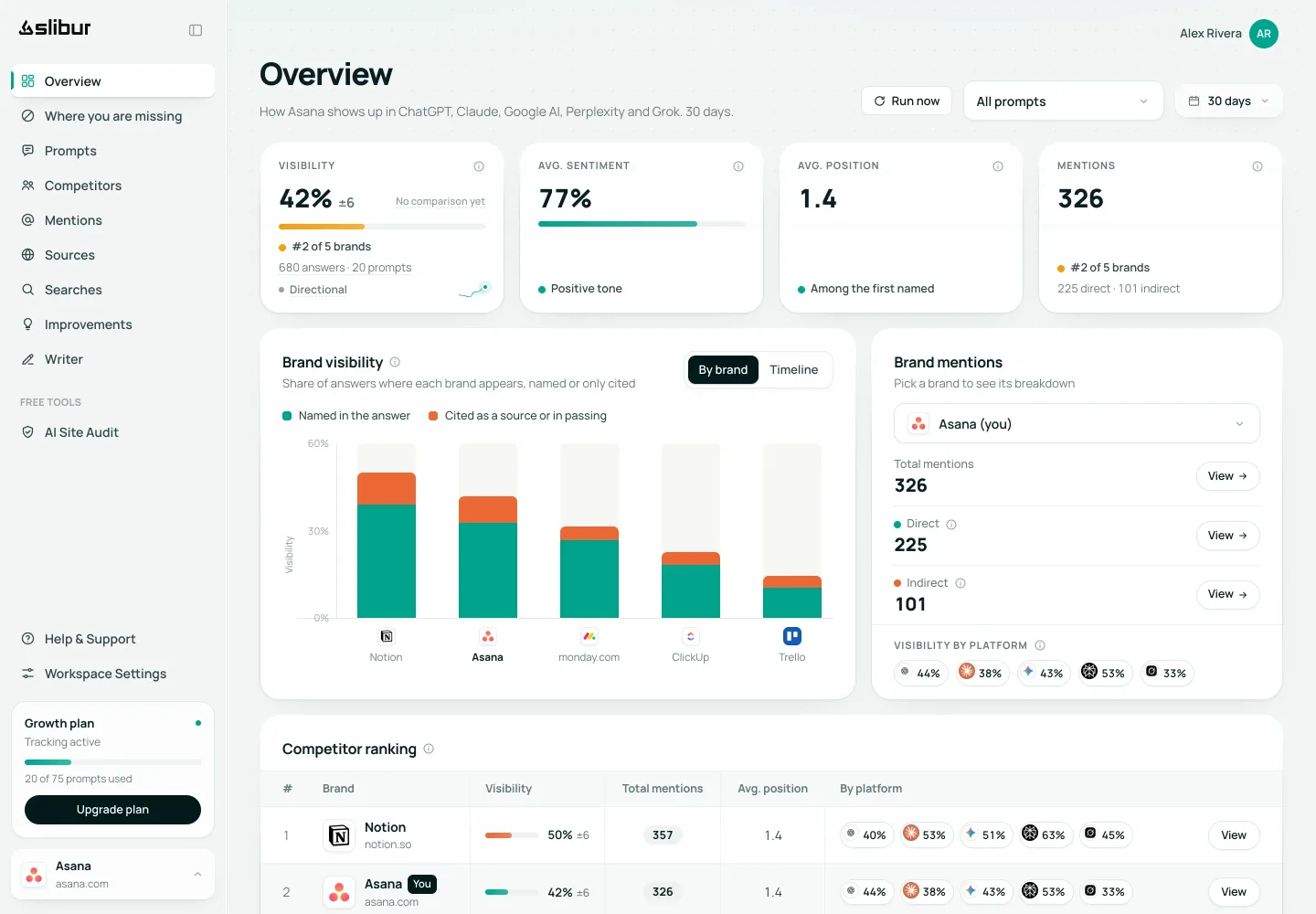
Slibur.com starts where a tracker does. It puts your customers’ questions to ChatGPT and Google AI Overviews every day and to Claude, Perplexity and Grok every week, without your brand in the prompt, and records who gets named, in what order, with what tone and from which sources. Its Where you are missing view lines up every tracked question against every platform, starting with the ones where no AI names or cites you, and shows who appears in your place.
The optimization part is a weekly list called Improvements: 3 tasks on Starter and Agency, 5 on Growth, 8 on Scale. The code picks each task from a closed catalogue of 17 actions and attaches the pages that decide that question, whether each page names you or a rival, and how solid the advice is (strong evidence, medium evidence or a bet). A language model only writes why it matters and the angle. Slibur.com then rereads those pages every week to check whether anything moved. Its own expectation is modest and worth repeating: a few points over about eight weeks in answers that use web search, and little or nothing in closed lists the model learned in training.
The third piece is the writer. Pick a tracked question and it drafts an article or a ranking from what the AIs cite and search for, the top Google results and your own site, leaving marked gaps for facts only your company knows. Starter includes 5 drafts a month, Growth 15 and Scale 40; you edit them in the app and copy or export them to HTML, Markdown or Word. Plans cost $59, $129 and $299 a month, all five platforms included, and agencies pay $2.49 per client plus $0.95 per prompt. The 18-check AI-readiness audit is free and stays free after the 7-day, no-card trial.
Pros
- Tracking, tasks and drafts on every paid plan, no credits
- Each task names the pages behind it and an evidence level
- Checks weekly whether a task changed anything
- Drafts leave gaps for your own facts instead of inventing them
- Five platforms on every plan, from $59
Cons
- The audit reads only the home page, robots.txt, the sitemap and llms.txt, not the whole site
- It never publishes or edits your site: you do the work
- No Gemini app, Google AI Mode or Copilot
- Claude, Perplexity and Grok are checked weekly
- No API, integrations or traffic measurement
Verdict: The most complete measure-to-fix loop for the price on this list. Skip it if Gemini or AI Mode matter most, or if you need the tool to push changes to your CMS.
Source: Slibur.com pricing page, checked Nov 2026.
Try Slibur.com free for 7 days2. Otterly.AI
Small teams that want audits and a few weekly pointers on a low budget
Otterly.AI is a monitoring product first, but its Lite plan at $29 a month ($25 billed yearly) adds two things that matter for optimization: 3 recommendations per week and 1,000 GEO audits per month. Lite tracks 15 prompts daily on ChatGPT, AI Overviews, Perplexity and Copilot.
Standard, at $189, lifts recommendations to unlimited and audits to 5,000 URLs, with API access. Gemini and AI Mode cost $9 extra each and Claude $29, so the bill grows if you need those. The 7-day trial needs no card, according to its FAQ.
Pros
- Recommendations included from the cheapest plan
- Large URL audit allowance
- Copilot included
- No-card trial
Cons
- Only 15 prompts on Lite
- Claude, Gemini and AI Mode are paid add-ons
- No content drafting listed
Verdict: A good first step if you want guidance on a tight budget and can live with 15 prompts.
Source: Otterly.AI pricing page, checked Oct 2026.
3. Goodie AI
Brands with budget that want agents to produce fixes
Goodie AI pairs daily tracking with a set of agents: a writer, an optimization agent, blog generation and technical fixes. They run on monthly action credits, 50 on Core and 100 on Pro. Core costs $295 a month for 110 prompts on ChatGPT, AI Overviews, Perplexity, AI Mode and Copilot; Pro costs $999 and adds Gemini and shopping assistants.
It also lists a page scorecard and prompt research, which helps decide where to spend credits. Core covers one brand in 2 countries and 2 languages. There is a 7-day trial on Core; Pro and Enterprise start with a demo.
Pros
- Writer, optimization and technical agents
- AI Mode and Copilot on Core
- Page scorecard
- Daily on every plan
Cons
- $295 entry price
- Agent work is capped by credits
- Claude and Grok only on Enterprise
Verdict: The heaviest optimization toolkit here, priced for teams that will use it every week.
Source: Goodie AI pricing page, checked Nov 2026.
4. Promptwatch
Technical teams that want to see crawlers and answers side by side
Promptwatch Essential costs $95 a month for 50 prompts across all its models, capped at 6,000 answers, with 500 agent credits and 1,500 audit pages. Essential has one seat and no crawler logs.
Professional, at $245, is where the optimization features stack up: 5 AEO articles a month shared with content refresh, 25 million crawler log events, a knowledge base and two seats. Crawler logs show whether AI bots actually fetch your pages, which closes a gap most trackers leave open. The trial lasts 7 days on monthly billing.
Pros
- Audit pages from the entry plan
- Crawler logs from Professional
- Articles and content refresh on Professional
- API and MCP on every plan
Cons
- One seat on Essential
- No crawler logs on Essential
- Shared answer cap across models
Verdict: Best for teams that want diagnostics deep enough to debug AI access, if they step up to Professional.
Source: Promptwatch pricing page, checked Nov 2026.
5. AthenaHQ
Trying recommendations before paying, then scaling to 11 models
AthenaHQ’s free Essential plan includes 300 credits on five models, prompt and response analysis, source and competitor insights, content recommendations and its Athena AI agent. That makes it the easiest way on this list to see what an optimization suggestion looks like without paying.
Starter jumps to $295 a month for 3,600 credits across 11 models, with GA4 and Search Console integration and CSV exports. Credits are spent per AI response, so you decide how often each model runs.
Pros
- Recommendations on the free plan
- 11 models on Starter
- GA4 and Search Console
Cons
- Big jump from free to $295
- Credits need planning
- How often prompts run is not stated
Verdict: Try the free plan for the recommendations; pay only if you need its model breadth.
Source: AthenaHQ pricing page, checked Oct 2026.
6. Writesonic
Teams whose main gap is producing content
Writesonic began as a writing product and now sells GEO tracking alongside it. Its Starter plan costs $99 a month ($79 billed yearly) for 50 prompts tracked daily on ChatGPT, Gemini and AI Overviews, with competitors and Search Console data.
Sentiment and GA4 sit on higher plans. You can start free without a card.
Pros
- Writing is the core product
- Gemini included
- Free start without a card
Cons
- Three engines
- No Claude, Perplexity or Grok
- Sentiment on higher plans
Verdict: Choose it if drafting volume is your bottleneck and Gemini matters more than Claude or Perplexity.
Source: Writesonic pricing page, checked Oct 2026.
7. AIclicks
A free audit first, then tracking with AI-written content
AIclicks combines AI visibility tracking with AI-written content. Starter costs $59 a month for 30 prompts, daily, on three engines you pick from ChatGPT, Gemini, Copilot, AI Overviews and AI Mode.
Before paying you can run a free visibility audit without signing up; the trial lasts 3 days.
Pros
- Free audit with no signup
- Content writing included
- Gemini, Copilot and AI Mode options
Cons
- Three engines per plan
- Short 3-day trial
- No Claude, Perplexity or Grok
Verdict: Worth a look for Google-heavy and Microsoft-heavy audiences on a small budget.
Source: AIclicks pricing page, checked Oct 2026.
8. Profound
Enterprises that want agents, traffic data and a managed rollout
Profound sells tracking plus AI Marketer agents, Prompt Volumes and Agent Analytics, which reports AI-sourced traffic. Enterprise tracks up to nine engines daily on custom pricing.
Brands start with a 7-day trial of 50 prompts that Profound chooses and you cannot edit. Agencies can begin at $99 a month for pitch workspaces, but each full client workspace adds $399 a month, with 400 agent credits each.
Pros
- Agents and traffic data together
- Up to nine engines
- Daily refresh
Cons
- No public brand price
- Trial prompts are fixed
- Grok and Meta AI not listed
Verdict: Fits large brands that measure success in traffic and want a vendor team on call.
Source: Profound pricing page, checked Oct 2026.
9. Scrunch
Brands that also track AI bot traffic
Scrunch Core costs $250 a month per brand for 125 prompts and 5,000 responses on ChatGPT, Perplexity, AI Overviews and Copilot, with 5 site audits a month and AI bot traffic reporting.
Enterprise adds its Agent Experience Platform, more models and SSO. Core has a 7-day trial.
Pros
- Site audits included
- AI bot traffic
- Five seats on Core
Cons
- $250 per brand
- Four engines on Core
- Refresh every 72 hours after two weeks
Verdict: For brands that see AI agents as visitors to optimize for, and can afford per-brand pricing.
Source: Scrunch pricing page, checked Oct 2026.
10. Peec AI
Daily data on three chosen models, with agent credits
Peec AI Starter costs $95 a month for 50 prompts on three models you choose from ChatGPT, AI Mode, AI Overviews, Copilot, Gemini and Naver, refreshed daily. The plan table lists 500 agent credits a month on Starter.
Our data does not record what each agent credit buys, so ask before counting on it as an optimization feature. Users are unlimited; Perplexity costs extra.
Pros
- Naver among the model options
- Unlimited users
- Agent credits on every plan
Cons
- Three models per plan
- Perplexity extra
- Agent features not detailed in our data
Verdict: A strong measurement tool with a growing action layer; check the agent side in a demo.
Source: Peec AI pricing page, checked Nov 2026.
11. Semrush AI Visibility
Semrush users who want AI checks inside their site audit
Semrush’s AI Visibility Toolkit costs $99 a month per domain for 25 tracked prompts, plus AI Search checks in Site Audit for up to 100 pages, prompt research and AI competitor analysis.
Each campaign asks one engine (ChatGPT Search, AI Mode or Gemini), each user needs a license, and the toolkit has no free trial.
Pros
- AI checks inside Site Audit
- Prompt research
- Familiar SEO workflow
Cons
- One engine per campaign
- Per-user licensing
- No toolkit trial
Verdict: Sensible if your team already lives in Semrush and wants AI checks next to classic SEO work.
Source: Semrush AI Visibility pricing page, checked Nov 2026.
What an LLMO workflow looks like, week by week
Tools differ, but the work they support follows the same loop. A team that runs it for two months usually learns more than one that buys a bigger plan and checks it once a quarter.
- Pick 20 to 50 real questions. Use the words customers type, without your brand name in them: comparisons, “best X for Y”, problem-led questions. Sales calls and support tickets are better sources than keyword tools here.
- Take a baseline for two or three weeks. AI answers vary from one run to the next, so a single snapshot can mislead. Wait for a trend before acting on it.
- Check access before content. Make sure AI crawlers can reach your pages, that the key text is visible without JavaScript and that your sitemap is clean. A content plan cannot fix a blocked bot.
- Read the sources behind the answers you lose. The pages a model cites for a question are the shortlist that decides it. Note which ones mention a rival and not you.
- Do three to five things a week. Update a page, publish a missing comparison, correct a wrong fact, earn a mention on a cited review site. Small and regular beats one large overhaul.
- Re-measure the same questions. Give changes four to eight weeks in answers that use web search. Answers that come from training data alone move slowly, if at all.
Steps 3 to 5 are where trackers stop and LLM optimization tools earn their price. If you prefer to run the loop with a free audit and a spreadsheet, our list of GEO audit tools covers the diagnostic side.
The three kinds of fix an LLMO tool can point you to
- Access fixes
- Robots rules that block GPTBot or other AI crawlers, pages that render their main text only in JavaScript, a missing or broken sitemap, an llms.txt file with dead links. These are cheap to fix and sit upstream of everything else. OpenAI documents its crawlers and how to allow them, and Google explains that its AI features draw on the same index as Search, so classic indexing problems carry over.
- Fixes on your own pages
- A clear, direct answer near the top of the page, comparisons with named alternatives, prices and specs written as text, statistics and quotes with a source. The original GEO study from Princeton and partners reports that adding citations, quotations and statistics raised visibility in generative answers by up to 40% in its test set. It is one study, but it matches what the cited pages in most categories look like.
- Fixes on other people’s pages
- Often the answer is decided by a review site, a directory, a forum thread or a “best of” list that you do not own. The fix is to get listed, correct an outdated entry or earn a mention. Tools that show cited sources by domain make this visible; tools that only count mentions hide it.
A good LLMO tool tells you which of the three a question needs. Treating every lost answer as a content problem is the most common way to waste a quarter.
AI answer drafts are not the same job as content optimizers
Content optimizers such as Frase or Surfer score a page against the pages that rank in Google for a keyword and suggest terms, headings and length. That is a mature category, and nothing on this list replaces it for classic SEO writing.
The drafting features in LLM optimization tools start from a different input: the answers an AI gave to a tracked question, the sources it cited and the searches it ran in the background. The goal is a page that fills the gap those answers show, rather than a page that matches a keyword. Many teams will use both, an LLMO tool to decide what to write and a content optimizer or an editor to polish it.
Whatever tool drafts the text, the facts that make a page worth citing come from you: real prices, customer numbers, test results, opinions with a name behind them. Prefer tools that leave those blanks visible over ones that fill them with plausible filler.
How we ranked these LLMO tools
We read each vendor’s pricing page and documentation between October 19 and November 10, 2026, and recorded four things: what the entry plan measures, whether it diagnoses your site, whether it turns data into tasks, and whether it drafts content. A tool scored higher for covering more of that loop on a public, self-serve plan.
Slibur.com is our product. It ranks first because it covers all four steps on every paid plan for $59 and up, and because its tasks say which pages they rest on. Tools with deeper agents or wider engine lists rank lower because they cost more, sell by quote, or put the fix features on higher tiers.
- Measure
- Engines and prompts on the entry plan, and how often they refresh.
- Diagnose
- Site audits, crawler checks or page scoring included without a sales call.
- Assign
- Recommendations or tasks, and whether they show the evidence behind them.
- Draft
- Content writing included in the plan, and how it handles facts it cannot know.
Frequently asked questions
What are LLM optimization tools?
Software that measures how large language models such as ChatGPT, Claude or Perplexity answer questions about your market, then helps you improve those answers through site audits, recommended tasks or content drafts. Pure trackers do only the first part.
What is the best LLM optimization tool?
We rank Slibur.com first because every paid plan combines tracking on five platforms, a weekly task list backed by the pages behind each question and a content writer, from $59 a month with a 7-day trial and no card. Slibur.com is our product. Goodie AI has the deepest agent toolkit from $295, and Otterly.AI is the cheapest tracker with recommendations at $29.
Is LLMO the same as GEO or AEO?
They overlap almost entirely. LLMO, generative engine optimization and answer engine optimization all describe getting mentioned and cited in AI-generated answers. LLMO puts the emphasis on the language models themselves, while AEO and GEO are more common in marketing teams.
How long does LLM optimization take to show results?
Expect weeks, not days. Changes tend to show first in answers that use live web search, often over four to eight weeks. Answers drawn from a model’s training data change slowly and may not move until the next model update.
Can an LLM optimization tool guarantee that ChatGPT recommends my brand?
No. No vendor controls what a model says. A good tool shows which answers you lose, which sources decide them and what to work on, and then measures whether the work helped.
Are there free LLM optimization tools?
Yes, for parts of the loop. AthenaHQ has a free plan with content recommendations, AIclicks runs a free visibility audit without signup, and Slibur.com’s 18-check AI-readiness audit stays free after its trial. Ongoing tracking with tasks is paid everywhere.
Do I still need a separate LLM tracking tool?
Not if your LLMO tool already measures the engines you care about at the cadence you need. Add a dedicated tracker only for models it does not cover, such as Gemini, DeepSeek or Meta AI.
Sources
Each tool card names the official page its figures come from. The guide also relies on:
- Aggarwal et al., GEO: Generative Engine Optimization (arXiv)
- Google Search Central: AI features and your website
- OpenAI: overview of OpenAI crawlers
By the Vértigo Marketing team Published Data checked
Keep reading
- The best LLM tracking tools in 2026 for brand visibility across AI models
- The 8 best GEO audit tools in 2026, with a 20-point checklist to run your own
- Knowatoa alternatives that cover more engines for the entry price
- Brandlight alternatives you can price and try without a demo
- Vértigo Marketing GEO agency services in the United States
- GEO agency services in the United Kingdom